How your iPhone can screen calls, sit on hold for you
Apple’s iOS 26 gives your iPhone the power to screen unknown callers and hold your place in line.
Problem Solved
- Apple is now recommending that iPhone users update to iOS 26, changing it from an optional upgrade.
- Users with an iPhone 11 or newer can download and install the iOS 26 update.
- While users can remain on older systems like iOS 18, they may need to upgrade to receive future security fixes.
Apple is changing its tactics and recommending that iPhone users update to the latest version, rather than leaving it as optional.
The technology giant has changed iOS 26 from an “optional upgrade” to a recommended one, seemingly pushing those who have not yet upgraded to do so.
Apple has continued to update iOS since its launch, and with each new version, there are minor updates and bug fixes. Though it’s common for Apple to do so, many who own Apple devices don’t immediately update their products due to concerns that new updates may do more harm than good.
According to Apple technology blog MacRumors, Apple is still providing iOS 18 security updates to those who choose to stay on the operating system, but that may stop in the coming months. Users who want to keep up to date on security fixes will need to upgrade to iOS 26, though Apple will continue to provide iOS 18 updates for devices that do not support iOS 26.
Here’s what to know about iOS 26.
Apple iOS 26.2 release date
The Apple iOS 26.2 update is expected to roll out likely no later than Dec. 15 or Dec. 16, per AppleHeadlines. On Dec. 3, Apple released the iOS 26.2 release candidate (RC) to developers, indicating a public release is imminent.
How is iOS 26 different from iOS 18?
Here are some of the new features that come with iOS 26:
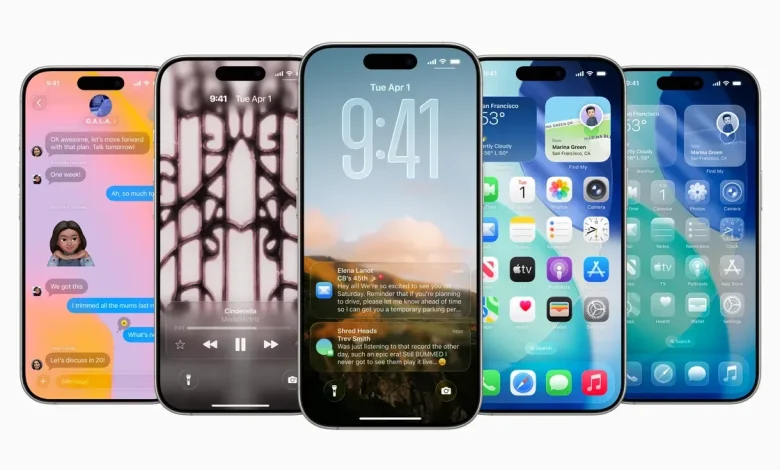
- A new design for your home screen, lock screen, control center, and apps called Liquid Glass
- Apple Intelligence-compatible devices can now perform live translation, translating text and audio in the Messages app, displaying live, translated captions in FaceTime, and more
- Apple Intelligence can automatically identify and summarize order-tracking details from emails, allowing users to view order details and progress notifications in one place
- More ways to manage unwanted calls and screen messages from unknown numbers
- Apple Music will display translated lyrics for select songs sung in other languages
- The new Games app
- The Phone app can notify you when a live agent is ready for you if you’ve been on hold
How do I update my phone?
Ready for the latest version of iOS? Plug your device into power, connect to Wi-Fi, then go to settings, said Apple. Go to General, then tap Software Update. You’ll be able to see the currently installed iOS on your iPhone and whether an update is available. If there is an update, tap to download and install it.
What phones will support iOS 26?
People with an iPhone 11 or newer can download iOS 26. The update is also available to people with an iPhone SE (2nd generation and later). However, some of the new features may only be available on newer iPhones. For example, Apple Intelligence features are compatible with iPhone 15 Pro models and newer, according to Apple.
How long does it take to download iOS 26?
According to several tech and Apple blogs, downloading iOS 26 can take anywhere from 30 minutes to a couple of hours.
The exact time required can depend on several factors, including internet speed, device model, Apple’s server load, and the size of the update.
Should I download iOS 26.1?
Yes, if you have an iPhone 11 or later that can install iOS 26, Apple says it is best to update your phone from iOS 18 to iOS 26.1 (which came out in September). This will help prepare for the new 26.2 launch.
Can I still use iOS 18?
Apple isn’t forcing users to update to iOS 26, and users have been able to stay on prior-generation versions of iOS since iOS 15; however, it doesn’t last forever. Apple appears to be “pushing” users to update to iOS 26, moving the newer software update to the top of the list under Settings on their iPhones in recent days. Tech experts say customers who want to stay on top of security fixes will need to transition to iOS 26, though Apple still supports those who can only run iOS 18.
Jordan Green covers trending news for The Commercial Appeal. She can be reached at jordan.green@commercialappeal.com.